
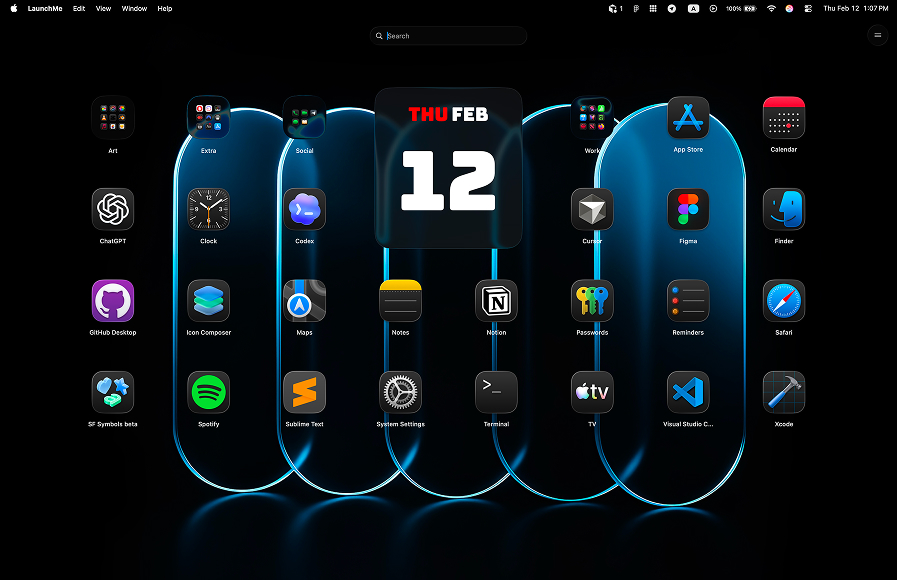
LaunchMe vs Launchie. Better Launchpad Replacement for macOS 26
Looking for the best Launchpad replacement for macOS? In this guide, we compare LaunchMe vs Launchie across customization, organization, speed, and everyday workflow features so you can pick the launcher that keeps your app library clean and fast on macOS 26 Tahoe and beyond.
LaunchMe vs Launchie: quick summary
LaunchMe is built for people who want a highly customizable app launcher that feels native on macOS, stays fast with large app libraries, and includes many “power” features in the Free tier. Launchie can cover the basics, but several convenience features you use daily are paid there while available in LaunchMe without an upgrade.
Feature comparison table
The table below highlights what you get in LaunchMe for Free vs Pro, and what’s available (or not) in Launchie. If you’re choosing a launcher mainly on capabilities, scan this first then jump into the deeper breakdown.
How we compared LaunchMe and Launchie
We compared both launchers using the same checklist: activation speed, everyday organization, free vs paid feature access, customization depth, and practical tools used in daily work. The feature matrix in this article is based on LaunchMe product data.
Source: Download LaunchMe.
Why LaunchMe wins for organization and daily workflow
A launcher is not just a grid of icons. It’s a workflow tool: how quickly you can find apps, keep them organized, and avoid clutter as you install new software. LaunchMe is designed around that reality.
Folders, pages, and clean layout habits
- Save Layouts in LaunchMe (Free) makes experimentation safe: try new setups and revert instantly.
- Hide Apps in LaunchMe is a Pro feature. Use it to keep utilities and rarely used apps out of sight without uninstalling.
- Page with Categories (Free) helps segment work vs personal tools so you’re not searching the entire library every time.
Launch faster with Hot Corners and Gesture Invoke (Free)
When you open a launcher dozens of times a day, activation matters. LaunchMe includes Hot Corners and Gesture Invoke in the Free tier, so you can open your app grid instantly from muscle memory. In Launchie, these activation shortcuts typically require a paid tier.
If you want to enable the trackpad gesture workflow, see our help guide: Learn more here.
Customization: where LaunchMe goes further
LaunchMe is built to adapt to your preferences. If you like to tune how your launcher looks and behaves without breaking your layout, LaunchMe provides a deeper customization set than Launchie.
- Widgets (Pro): put useful info and actions directly in your launcher, including GIF, photo, affirmations, calendar, and animations.
- Live Wallpaper and Dynamic Wallpaper (Pro): add motion and personality to the launcher experience.
- Glass or Flat themes (Pro): choose a modern look that matches your desktop style.
- App icons customization, Clear colored icons, and Hide Titles (Pro): keep the grid clean and consistent.
- Change icon size and Auto Dark / Light Theme (Free): tune readability and match system appearance automatically.
- Snow animation (Free): optional visual polish without sacrificing usability.
Utilities built in (Free): less context-switching
LaunchMe includes helpful tools you can use without opening separate apps: Search Files, Clipboard, and Calculator are available in the Free tier. For many workflows, that means fewer windows and less switching especially when you’re focused.
Multi-language support: works in your language
LaunchMe supports 11 languages: English, Chinese, Japanese, Korean, German, Italian, Spanish, Russian, Portuguese, Hindi, and Turkish. Whether you work in multiple languages or prefer your native interface, LaunchMe adapts automatically to your macOS system language settings.
Pricing and value: what’s free in LaunchMe vs paid in Launchie
LaunchMe has a very flexible pricing model: you can use a large set of features for free, or choose the Pro plan format that fits you best - Monthly subscription, Yearly subscription, or Lifetime purchase. This way, each user can pick the best option for their own workflow and budget.
If you’re comparing LaunchMe and Launchie because you want the most features without paying immediately, LaunchMe is typically the better deal. Key workflow accelerators like Hot Corners and Gesture Invoke are Free in LaunchMe, while Launchie often gates them behind a paid plan. Even where LaunchMe has Pro features (widgets, themes, deeper icon styling), the Free tier still covers a complete “daily driver” launcher.
Try Pro features free for 7 days: Not sure if you need Pro customization? LaunchMe lets you test all Pro features: widgets, live wallpapers, themes, and advanced icon styling free for one week. Use the trial to decide whether you want to stay on the robust Free tier or unlock full customization.
Which one should you choose?
- Choose LaunchMe if you want maximum features, fast activation (Hot Corners + gestures), and a highly customizable layout.
- Choose Launchie if you only need a simple launcher and don’t mind paying for convenience features.
FAQ
Is LaunchMe a good Launchpad replacement for macOS 26 Tahoe?
Yes. LaunchMe is designed specifically for modern macOS workflows and provides a familiar app-launching experience with significantly more control over layout, organization, and activation.
Does LaunchMe support quick activation methods?
Yes. LaunchMe supports Hot Corners and Gesture Invoke in the Free tier, so you can open it instantly without hunting for an icon.
Can I keep my launcher clean without uninstalling apps?
Yes. LaunchMe supports Hide Apps (Pro) and categories (Free), so you can keep rarely used utilities out of your main view while still having access when needed.
Verdict: LaunchMe is the stronger choice
If you’re searching “LaunchMe vs Launchie” because you want a launcher that stays fast, looks great, and includes key workflow features without forcing you into a paid tier, LaunchMe is the clear winner. It combines customization, utility tools, and instant activation in a package that scales with your app library.
You can download LaunchMe from this site and try Pro features free for 7 days to find the perfect setup for your workflow.